Understanding users: group blog post #1
- Nhu Ngo
- Jan 27, 2021
- 6 min read

Updated: Jan 28, 2021
Group blog #1's contributors: Claudia-france Feochari, Julie Kang, Trinh Nhu Ngo, Mariana Cordova Perez
Education, for centuries, was ideally about communicating, accepting, and challenging ideas and knowledge — Education was gained from feedback. This ideal concept of education is best envisioned in Raphael’s ‘School of Athens’, where he depicted great thinkers like Socrates, Plato, and Aristotle, two sets of teacher and student relationships, sharing their love for wisdom (ie. philosophy) in-person, face-to-face.

School of Athens — Raphael (1511)
Until recently, the majority of education was following the ancient Greek forms — in order to learn from the best minds, we had to relocate, and learn in class.
In the 21st Century, there were incremental movements towards online education through websites such as Coursera, edX, but with Pandemic being a definite game-changer, online learning and meetings are now the new normal.
But, what makes Coursera or edX different from our current Zoom classes?
Synchronous interaction with people — social interaction.
Introduction
In light of the trend of online meetings being normalized and widely accepted due to the pandemic, we are hoping to create a dashboard to visualize a student’s personal progress within a group. The interface is aimed to give feedback regarding individual performance in a group setting. Our goal is to design an interface to provide “analytics to students on their activity, productivity, and creativity”.
We interviewed four people who are currently pursuing Master’s and Undergraduate degrees. The interviews were conducted to really understand our potential users, and to look at the numerous pain points that may be interpreted as our opportunities.
With these interviews we were able to build:
Empathy map, to aggregate what our users saw, heard, thought, felt, told, and did when talking about their experience learning remotely. This allowed us to also capture the pains and gains of our users, and to look at our users from multiple angles.
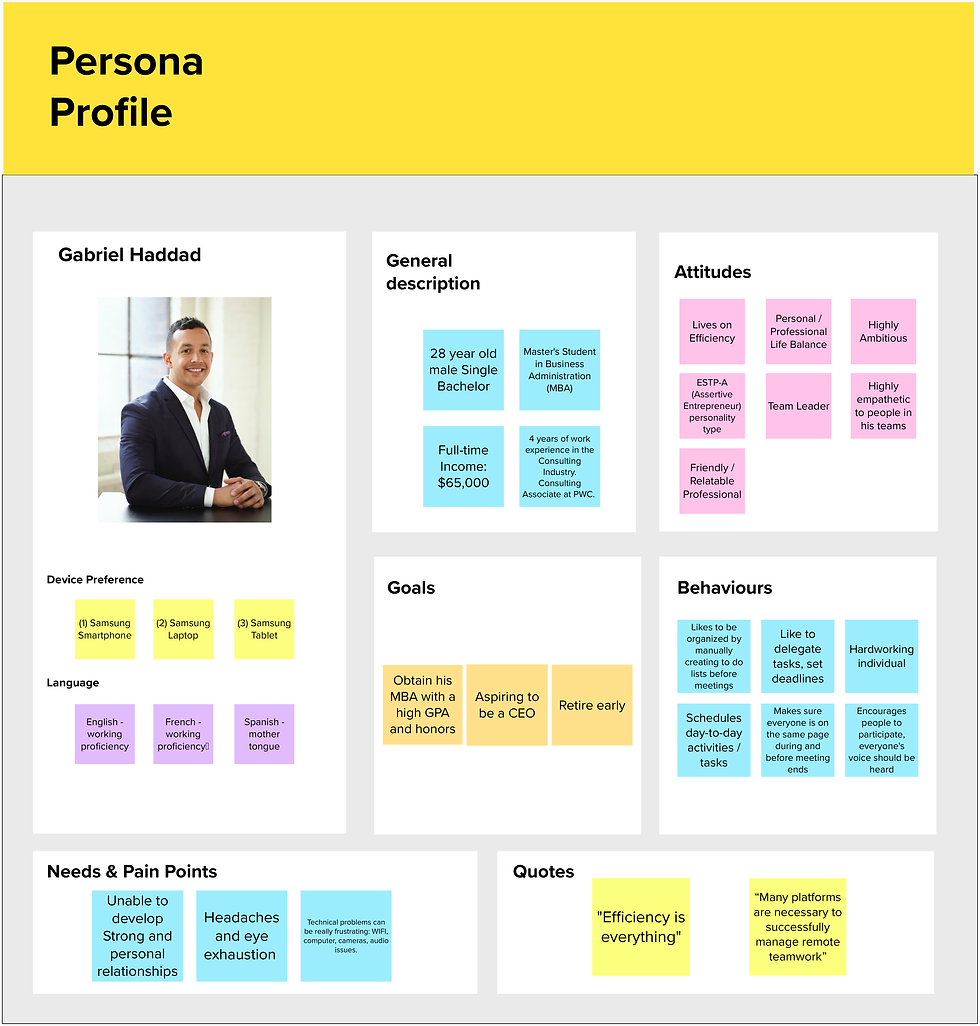
Persona, to personify our user by listing the similarities found in the individual interviews. It shows demographic and psychographic details, while also listing possible behaviors/ actions.
Experience map, to fully understand the customer journey to see the potential emotions, and pain-points and opportunities for each step of the journey.
User interview and observation
Interview summary:
Participant 1: Stephanie
Stephanie is a Montreal born woman currently residing in Gatineau and is currently taking Undergraduate prerequisite classes required for a master's degree in Human Relations Management while working full-time. She holds an undergraduate certificate in human resource management from McGill University and is currently employed as a Human Resource Coordinator for Infrastructure Canada. She uses a Microsoft Chromebook Tablet provided by her governmental job that runs Windows and heavily uses MS Teams as it offers all the features she needs for both her work and school life. The main struggle she faces with remote learning is that some websites on her tablet are blocked by her workplace (like Messenger). She feels that both oral and written contributions are equally as important and higher contributions are better. Keeping track of group work is done on Microsoft Word and one team member is delegated with formatting the final draft. Regular communication is done through Messenger. She feels that remote meetings could substitute in-person meetings and they are more convenient overall as she can study at an Ontario university in her Quebec home. Overall, remote learning is positive for her.
Participant 2: Amie
Amie frequently uses Zoom, Messenger, and Google Docs for remote learning. In a remote meeting, she feels that there is less pressure to participate, and a different group dynamic as individual satisfaction on the group’s decision needs to be frequently confirmed due to lack of nonverbal communication. She feels that remote meetings are able to save travel time; accommodate different schedules easily; let more shy participants have more opportunities to speak up; and increase time efficiency since there is no need to socialize and network so there's a tendency to get things done quicker. An effective remote group meeting consists of being organized (with having a list of goals and deadlines set prior to the meeting), being on time, and finishing on time, while also making sure everyone is on the same page by checking-in during and at the end of the meeting. Oral contribution is needed for peer evaluation and personal learning of the project and class, while written contribution visualizes the outcomes of discussion and helps set up the agenda for the next meeting. Lastly, she believes that remote learning cannot be a long-term substitution as human touch is irreplaceable and irreplicable no matter the technologies being used.
Participant 3: Valeria
Valeria is a Master's student and part-time employee. For schoolwork, she usually uses Google to share documents, Zoom for meetings, and Teams for quick conversations. Besides her academics, the participant also works part-time and has a one-year-old baby. She finds remote learning very convenient; however, she also recognizes that it has some limitations to fully experience a “normal” learning environment. She considers that since the lockdown remote interactions have changed dramatically. She explained that these changes are not so much a result of tools improvements, but more because of the people's need and motivation to resemble the in-person experiences. She mentioned that currently available tools are sufficient for basic activities, such as video calls, conversation, sharing screen, etc., but have room to develop other features that could enhance more natural, strong, and committed interactions. Finally, the participant described that currently, any application has the all features that allow having a real group meeting experience. She finds that many apps are needed and this situation hinders group interactions. Therefore, she is convinced that there is room for many improvements to boost oral, written, and informal interactions, with the objective to resemble as much as possible in-person relationships.
Participant 4: Hyo
Hyo is a full-time Master’s Student, who also works full-time. He balances these tasks by blocking his evening hours and weekends for his studies. The technologies that he mostly uses are Zoom for video calls, Google Doc for collective writing, FB messenger and Whatsapp for communication, and Google Sheets for performance organization. He prefers these technologies because everyone knows how to use them. He likes virtual meetings as they can be accessed anywhere where there is WiFi. However, during meetings, he encountered problems such as lag in communication, from overlapping speech from speakers, and from trying to clarify the comments made by asking the speaker to reinstate or elaborate. The latter problem, he thought, came from not being able to meet in-person to see the speakers’ facial expressions. While he thought that equal share of oral and writing communication was important during meetings, he believed that the content was more important. He felt that effective meetings require participants to prepare their thoughts and ideas prior to the meeting, and follow an agenda with a set of goals to put a limit on irrelevant statements and make arrangements on the order of speakers.
3. Key quotes:
“Absolutely no difference in someone being 2 feet away from me in person or on a screen, changes nothing as an introvert”.
“At Queen's University, there are 700 people in class, good luck trying to easily speak with the professor, this is very hard with distance learning”.
“The thing with remote meeting is that you never know if somebody is lost if they don’t talk”
“There is a lot of distraction when you are not in class because when you are at home you have no authority control that looks after you.”
“Many platforms are necessary to successfully manage remote teamwork”
“It is difficult to substitute in-person group meetings. Online platforms still have many areas of improvement to accomplish this.”
"I use Zoom for video calls, Google Doc for collective writing, FB messenger and Whatsapp for communication, and Google Sheets for performance organization"
“The overall attention span on remote learning is low. It’s hard to concentrate, there are so many distractions.”
“Zoom fatigue is real.”
“Efficiency is Everything.”
4. Observations:
A recurring theme in keeping an effective remote learning environment is the need to stay organized. Organization is absolutely key when conducting work remotely - techniques such as manually writing down to-do lists and delegating specific tasks and setting internal deadlines among teammates was considered essential in order to stay in the loop while keeping it concise. Other traits, such as having a good Wi-Fi connection, being punctual and prepared for meetings as well as being transparent about things that can affect the group progress were considered preferred forms of manners of a team player in a virtual learning environment. Virtual learning has its advantages as it allows more time to manage different activities (studies, work, and children), and because it creates efficiency as participants are focused on getting the work done as quickly as possible and conversations are more project-related. The technologies that are used to assist virtual learning and meetings are all over the place. There is no “one-platform-fits-all” when it comes to remote learning. Users are used to jumping back and forth between platforms to achieve their goals. Online platforms still have a gap to fill in order to make remote meetings as coordinated as in-person interactions.
User research contextual analysis tool
The following are Contextual Analysis Tools we have developed to better understand our users:


Check out my Team Members’ Blogs!
Claudia — https://clauisawesome.wixsite.com/
Julie — https://juliekangubc.medium.com/
Mariana — https://marianacordovaperez.wixsite.com/


Comments